

The internet has made everyday life easier than ever before. People use websites and mobile applications to communicate with friends, shop online, manage bank accounts, store photographs, study, and run businesses. However, as more personal activities move online, protecting private information has become increasingly important.
Every time you create an account, install an application, complete an online form, or share a photograph on social media, you may reveal information about yourself. Some of this information is harmless when shared appropriately, but other details can expose you to identity theft, financial fraud, account hacking, phishing attacks, and privacy violations.
The good news is that you do not need to be a cybersecurity expert to improve your online safety. By developing a few practical habits, choosing trustworthy services, and understanding common internet threats, you can significantly reduce the risk of exposing your personal information.
In this guide, you will learn how to protect your personal information online, secure your accounts and devices, recognize suspicious messages, manage privacy settings, and respond if you believe your information has been compromised.
What Is Personal Information?
Personal information is any information that identifies you, relates to you, or can be used to learn more about you. Some information identifies you directly, while other details become sensitive when combined with additional data.
Examples of personal information include:
- Full name, date of birth, and home address.
- Telephone number and email address.
- Government-issued identification details.
- Bank account information and payment card details.
- Passwords, PINs, and account recovery codes.
- Private photographs, documents, and personal messages.
- Location information and travel history.
- Information about family members, employment, and education.
Your digital identity can include information collected across many different websites and applications. Even details that seem unimportant on their own can sometimes help a scammer impersonate you or guess answers to account recovery questions.
Protecting your personal information means controlling what you share, securing the accounts that contain it, and understanding how online services collect and use your data.
Why Is It Important to Protect Your Personal Information Online?
Personal information is valuable to cybercriminals, scammers, and other unauthorized parties. When sensitive information falls into the wrong hands, it may be used for financial fraud, account takeover, impersonation, targeted scams, or unauthorized access to private files.
Understanding the risks can help you make better decisions about your online activities.
1. Prevent Identity Theft
Identity theft occurs when someone uses your personal information without permission, often to impersonate you or commit fraud.
A criminal who obtains enough identifying information may attempt to open accounts, impersonate you when contacting a service provider, or carry out other fraudulent activities.
Avoid publishing sensitive identity information on public profiles, and share official documents only through trusted services when there is a legitimate reason.
2. Protect Your Financial Information
Online banking, digital wallets, and shopping platforms make payments convenient, but they also create opportunities for fraud.
Scammers may send fake payment notifications, imitate bank websites, or persuade users to reveal verification codes.
Never share your banking password, card security code, or one-time verification code with an unknown person. If you receive an unexpected request involving money, verify it through your bank’s official application or contact channel.
3. Keep Your Accounts Secure
Email and social media accounts often contain private messages, photographs, contact information, and links to other services.
If an attacker gains access to your email account, they may attempt to reset passwords for other accounts connected to that address.
Protect your primary email account carefully. Use a unique password, enable multifactor authentication, and review recovery options regularly.
4. Protect Your Personal Privacy
Not every privacy risk involves financial fraud. Unnecessary sharing of personal information can also lead to unwanted contact, harassment, location exposure, or misuse of photographs.
Review what other people can see on your social media profiles. Share personal details with trusted individuals rather than making them publicly accessible by default.
15 Essential Ways to Protect Your Personal Information Online
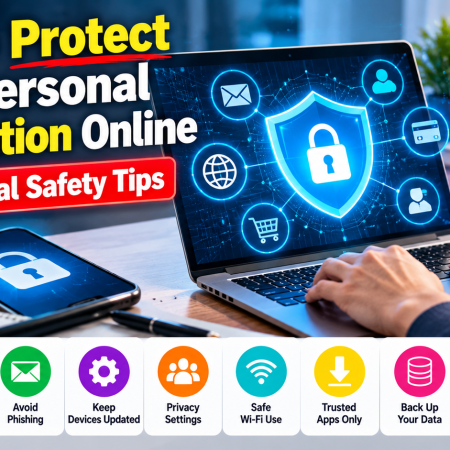
1. Use Strong and Unique Passwords
One of the simplest ways to protect your online accounts is to use a different, strong password for every important service.
Password reuse is risky because a password stolen from one website may be tested against your accounts on other platforms. If the same password protects your email, shopping account, and social media profile, one compromised service can put several accounts at risk.
Create passwords that are long, unique, and difficult to guess. Avoid using your name, birthday, telephone number, or common words combined with predictable numbers.
A reputable password manager can generate and securely store unique passwords for your accounts. This reduces the need to memorize dozens of complicated passwords.
Protect the password manager itself with a strong master password and multifactor authentication where available.
Practical tip: Start by changing reused passwords on your primary email, financial accounts, and important social media profiles.
2. Enable Two-Factor Authentication
Two-factor authentication, often called 2FA, adds another verification step when you sign in.
Depending on the service, you might need a password plus an authenticator code, security key, passkey, or another supported verification method.
This extra protection can prevent someone from accessing an account even if they discover your password.
Where possible, use passkeys, hardware security keys, or authenticator applications instead of relying exclusively on text-message codes. The strongest practical option depends on the service and your circumstances.
Never share verification codes with someone who contacts you unexpectedly. A caller claiming to be a bank employee or technical support representative may be trying to take control of your account.
3. Be Careful With Suspicious Emails and Messages
Phishing is a technique in which criminals attempt to trick people into revealing information, downloading harmful files, or visiting fraudulent websites.
A phishing message may pretend to come from a bank, delivery company, social media platform, employer, or government office.
It might claim that your account will be suspended, a payment has failed, or you must urgently confirm your identity.
Look for warning signs such as unexpected requests, unfamiliar sender addresses, unusual links, unexpected attachments, and pressure to act immediately.
Do not rely only on spelling mistakes to identify scams. Fraudulent messages can look professional and convincing.
If a message claims that you need to update an account, open the service’s official application or type its known website address into your browser. Do not use an unexpected link to sign in.
4. Keep Your Phone and Computer Updated
Software updates often contain security fixes that address weaknesses attackers could otherwise exploit.
An outdated operating system, browser, or application may expose your device to known vulnerabilities.
Enable automatic updates where practical and install security updates promptly. Update your web browser, mobile applications, operating system, and security software.
If a device no longer receives security updates, consider replacing it or using a supported alternative for sensitive activities.
Do not download unofficial update files from unknown websites. Use the operating system’s built-in update feature or the software provider’s official website.
5. Review Social Media Privacy Settings
Social media platforms allow users to share photographs, videos, locations, personal opinions, and life events. However, public posts can reveal more information than intended.
A photograph may reveal your workplace, school, home surroundings, travel plans, or other identifying details.
Review your privacy settings regularly and decide who can see your posts, contact you, tag you, or view your personal information.
Consider limiting access to your friends list, birth date, telephone number, and other identifying details. Remove old posts that disclose information you no longer want to share.
Remember that changing a post’s visibility does not guarantee that previously shared content has disappeared. Other people may have saved screenshots or copies.
6. Avoid Sharing Sensitive Information on Public Websites
Before entering personal information into an online form, ask whether the service genuinely needs it.
A legitimate service may require certain details to provide a product or complete a transaction. An unrelated website requesting extensive personal information should make you cautious.
Look for a clear privacy policy, identifiable contact information, and a reasonable explanation of how your information will be used.
HTTPS helps protect information transmitted between your browser and the website, but it does not prove that the website itself is trustworthy.
Avoid submitting identification documents, financial details, or private records to unfamiliar websites without verifying their legitimacy.
7. Use Public Wi-Fi Carefully
Public Wi-Fi is commonly available in hotels, cafés, airports, libraries, and other shared spaces. It can be convenient, but you should not assume that every network is legitimate or securely configured.
An attacker may create a network with a name similar to that of a nearby business in an attempt to attract users.
Verify the correct network name with the venue when necessary. Keep your device’s operating system and security protections updated, and avoid sensitive activities on networks you do not trust.
For banking or other important transactions, consider using your mobile data connection or another trusted network.
A reputable virtual private network, or VPN, can help protect some network traffic, particularly on untrusted connections. However, a VPN does not make phishing websites safe, eliminate malware, or guarantee anonymity.
8. Download Apps Only From Trusted Sources
Applications may request access to your contacts, photographs, microphone, camera, location, and other information.
Some permissions are necessary for an application’s main function, while others may be unnecessary.
Download applications from official app stores or the software developer’s verified website. Check the developer, reviews, update history, and requested permissions before installing unfamiliar software.
Be especially cautious with applications that promise unrealistic rewards, free access to paid services, or special features that require disabling security protections.
Remove applications you no longer use and review permissions periodically.
9. Protect Your Home Wi-Fi Network
Your home router connects your devices to the internet. If its security settings are weak, unauthorized users may be able to access the network or attempt to interfere with connected devices.
Change the router’s default administrator password and use a strong password for the Wi-Fi network.
Enable a modern security protocol supported by your router, such as WPA3 or WPA2-AES. Keep the router’s firmware updated and disable remote administration if you do not need it.
Check the connected-device list for unfamiliar devices. Consider using a guest network for visitors and devices that do not need access to your primary network.
If you are unsure how to configure your router, consult its official manual or your internet service provider.
10. Be Careful About Location Sharing
Location information can reveal where you live, work, study, or spend your free time.
Some applications collect location data to provide navigation, weather information, or nearby recommendations. Other applications may not need continuous access to your location.
Review location permissions in your phone’s settings and allow access only when appropriate.
Where supported, choose an option such as allowing location access only while using the application. Disable background location access when it is unnecessary.
Think carefully before posting real-time travel updates or photographs that reveal your current location to a broad audience.
11. Back Up Important Files
Protecting personal information also means protecting it from accidental loss, device failure, ransomware, and other incidents.
Regular backups can help you recover photographs, documents, and other important files if your device is damaged or compromised.
Use a trusted cloud backup service, an external storage device, or a combination of both.
Keep backup accounts protected with strong passwords and multifactor authentication. When possible, maintain a backup that is disconnected from your computer when not in use.
Test your backup process periodically to confirm that your files can actually be restored.
A backup is useful only if the required data is available when you need it.
12. Understand Website Cookies and Tracking
Many websites use cookies and other technologies to remember preferences, maintain sessions, measure traffic, and personalize content.
Some tracking technologies can also be used to build profiles of browsing activity across websites and services.
Review cookie choices and privacy settings when visiting unfamiliar websites. Consider restricting unnecessary third-party cookies and using browser protections that limit unwanted tracking.
Be aware that blocking all cookies can cause some websites to stop working correctly, particularly services that rely on login sessions or saved preferences.
You can also periodically review stored website data and clear information that you no longer need.
13. Protect Your Email Account
Your email address often serves as the recovery method for other online accounts. This makes email security especially important.
Use a strong, unique password and enable multifactor authentication.
Review recovery email addresses, telephone numbers, active sessions, and connected applications. Remove devices and third-party services you no longer recognize or use.
Be cautious about unexpected password-reset messages. If you did not request a reset, do not follow unfamiliar links or share verification codes.
If your email account is compromised, an attacker may use it to impersonate you or attempt to reset other passwords. Securing your email should therefore be a priority.
14. Learn to Recognize Online Scams
Online scams can arrive through email, messaging applications, telephone calls, social media, or fraudulent websites.
Common examples include fake giveaways, investment promises, technical support scams, impersonation attempts, and fraudulent job offers.
Scammers may use urgency, fear, curiosity, or attractive rewards to encourage quick decisions.
Be cautious if someone asks you to pay an unexpected fee, send money to unlock a prize, install remote-access software, or disclose a verification code.
Artificial intelligence has also made it easier to produce convincing text, images, audio, and videos. A familiar voice or realistic-looking image is not sufficient proof that a request is genuine.
Verify important requests through a separate, trusted communication channel before taking action.
15. Review Your Digital Footprint Regularly
Your digital footprint includes information you leave behind through websites, applications, online purchases, social media posts, and other internet activities.
Some information may be visible publicly, while other data is held by service providers.
Search for your name and commonly used usernames to understand what information is publicly available. Review old accounts and close those you no longer need, where possible.
Check privacy settings, remove unnecessary profile information, and review connected applications.
If a website publishes your personal information without permission, check whether it provides a legitimate removal request process. Removal is not always possible, and deleting information from one website does not necessarily remove copies held elsewhere.
Regular reviews can help you identify unnecessary exposure and make better decisions about what you share in the future.
What Should You Do If Your Personal Information Is Stolen?
Even careful internet users can become victims of scams or data breaches. If you believe your information has been exposed, acting quickly can help reduce the potential damage.
Step 1: Secure the Affected Account
If you can still access the account, change its password from a trusted device.
If you reused that password on other services, change those passwords too. Start with your email account and any accounts involving money or sensitive information.
Enable multifactor authentication and review recent account activity.
Step 2: End Unauthorized Sessions
Many services allow you to view active sessions and connected devices.
Sign out of sessions you do not recognize, remove suspicious connected applications, and verify that the recovery email address and telephone number have not been changed.
Follow the provider’s official account recovery process if you can no longer sign in.
Step 3: Contact Your Bank if Financial Information Is Involved
If you suspect that banking credentials, payment card information, or financial account details have been compromised, contact your bank through its official channel.
Ask about blocking suspicious transactions, securing the account, replacing compromised cards, and taking other appropriate steps.
Monitor account activity for transactions you do not recognize.
Step 4: Check Your Device for Security Problems
If you installed suspicious software or opened an unexpected attachment, disconnect the affected device from the network if you suspect active compromise.
Use reputable security tools and seek technical assistance if necessary. Change important passwords from a device you believe is secure.
Avoid downloading additional software from pop-ups or unknown websites claiming to fix the problem.
Step 5: Report the Incident
Report the incident to the affected service and relevant authorities in your country.
If you are in Nepal, consult the official Nepal Police Cyber Bureau website for current cybercrime reporting procedures and contact information: https://cyberbureau.nepalpolice.gov.np/
Preserve relevant evidence, such as suspicious messages, transaction records, and account alerts, where it is safe and appropriate to do so.
A Simple Online Privacy Checklist
You can use the following checklist to improve your online security.
- Use unique passwords for important accounts.
- Enable multifactor authentication wherever available.
- Keep your operating system and applications updated.
- Review social media privacy settings.
- Avoid clicking unexpected links or attachments.
- Download software from trusted sources.
- Review application permissions.
- Secure your home Wi-Fi network.
- Back up important documents and photographs.
- Review account recovery settings and active sessions.
- Share sensitive information only when necessary.
- Learn how to report suspicious activity.
You do not need to change everything at once. Start with your primary email account, financial accounts, and the devices you use most frequently.
Frequently Asked Questions
What is the safest way to protect personal information online?
Use strong, unique passwords, enable multifactor authentication, update your devices, and avoid sharing sensitive information unnecessarily. Be cautious about unexpected messages and verify websites before entering important details.
Is it safe to save passwords in a browser?
A reputable, properly secured browser password manager can be a reasonable option. Protect your device with a strong screen lock, enable available account security features, and keep the browser updated. A dedicated password manager is another option, particularly if you manage accounts across multiple devices.
Can hackers access my information through public Wi-Fi?
Public Wi-Fi can expose users to certain network-related risks, particularly when a network is malicious or poorly configured. Modern HTTPS connections protect much of the information exchanged with websites, but they do not eliminate every threat. Use trusted networks and avoid interacting with suspicious websites or messages.
Should I share my phone number on social media?
Share your number only when there is a good reason. Depending on your privacy settings, a publicly visible number may lead to unwanted contact, targeted scams, or attempts to link your accounts across services.
Does a VPN guarantee online privacy?
No. A VPN can protect certain network traffic and conceal your IP address from some destinations, but it does not prevent every form of tracking or protect you from phishing, malicious applications, or account compromise. Its benefits depend on the service, configuration, and activity involved.
How often should I check my privacy settings?
Review important account settings periodically and whenever a service changes its features, you install a new application, or you notice unexpected activity. It is also useful to review active sessions and connected applications from time to time.
Can I completely remove my personal information from the internet?
Complete removal is often difficult because information may exist in public records, archived pages, copied content, and third-party databases. You can reduce exposure by deleting unused accounts, removing unnecessary public information, and requesting removal from services that provide an appropriate process.
Why should children learn about online privacy?
Children may not always recognize the risks of sharing personal information, clicking suspicious links, or interacting with strangers online. Teaching them to protect passwords, question unexpected requests, and speak to a trusted adult when something feels wrong can help them develop safer digital habits.
Conclusion
Protecting your personal information online is an important part of using modern technology responsibly. From social media and online shopping to banking and email, many everyday activities involve information that should not be shared carelessly.
Fortunately, effective online protection begins with simple habits. Use unique passwords, enable multifactor authentication, keep devices updated, review privacy settings, and verify unexpected requests before responding.
Remember that no single tool or security setting can prevent every possible threat. A password manager, VPN, antivirus application, or privacy setting can be useful, but each addresses different risks.
The most effective approach combines secure technology with informed decisions. By taking a few minutes to review your accounts and improve your digital habits, you can reduce unnecessary exposure and create a safer online experience for yourself and your family.
Protect your privacy, think before you share, and make online security part of your everyday routine.
Additional Resources
For more information about personal cybersecurity, consult these trusted resources:
- Federal Trade Commission, Protect Your Personal Information From Hackers and Scammers: https://consumer.ftc.gov/articles/protect-your-personal-information-hackers-and-scammers
- Federal Bureau of Investigation, Staying Safe Online: https://www.fbi.gov/how-we-can-help-you/online-safety/stay-safe-online-simple-tips-for-adults
- Cybersecurity and Infrastructure Security Agency: https://www.cisa.gov/
- Nepal Police Cyber Bureau: https://cyberbureau.nepalpolice.gov.np/

Why Is Your Website Slow? Common Hosting Problems and Solutions



No Comment! Be the first one.